NO-CARRIER on a Good Cable: Fixing Link Autonegotiation
Reading interface flags before touching config: a NIC and switch that couldn't agree on speed, and the ethtool fix.
Symptom
I plugged the ThinkPad (Fedora) into an untagged access port on the lab switch, configured exactly like the one my main workstation uses. It showed "wired" briefly, then dropped.
ip link show enp0s31f6
# enp0s31f6: <NO-CARRIER,BROADCAST,MULTICAST,UP> ... state DOWN
nmcli device status
# ethernet  unavailable
Reading NO-CARRIER
NO-CARRIER means the NIC sees no physical link. The driver is loaded and the interface exists, so VLANs, IP addressing and routing aren't the issue yet. That leaves cable, port, or link negotiation.
Fix
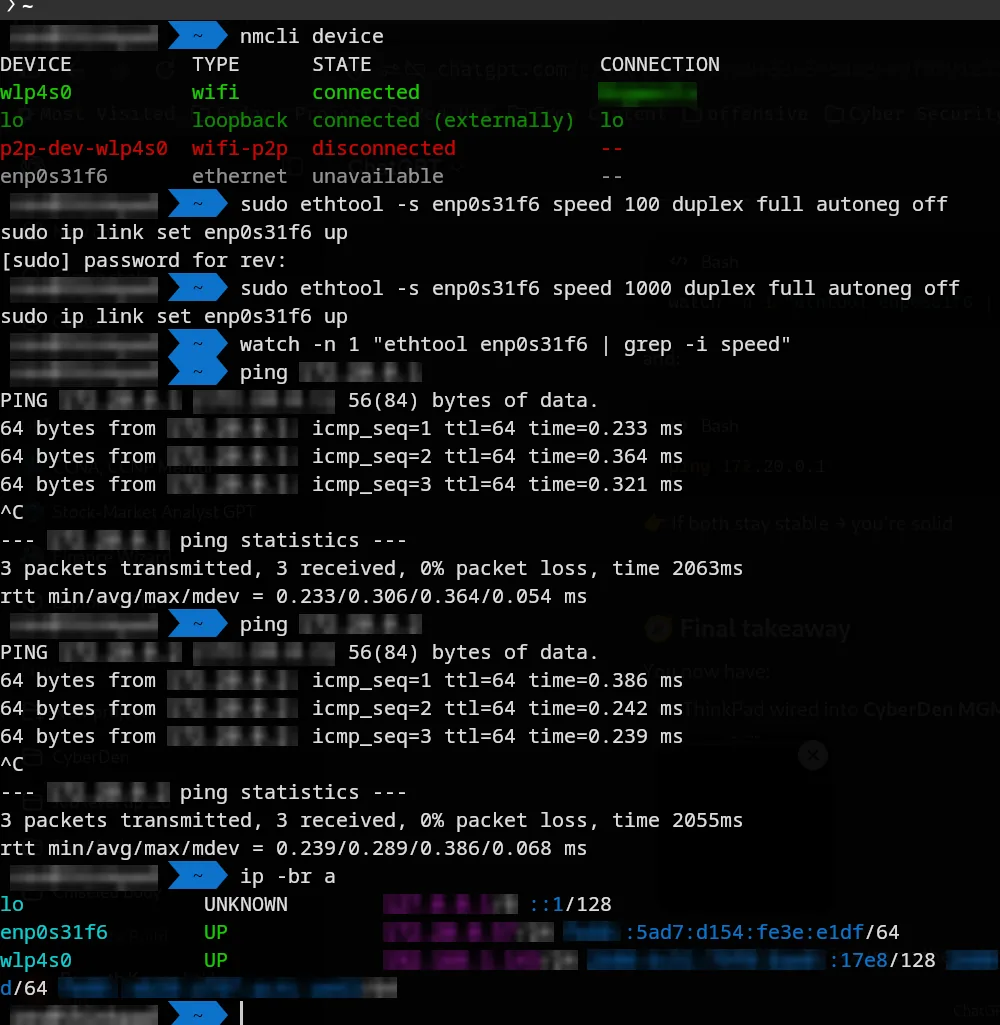
Forcing the link to skip autonegotiation brought it up immediately:
sudo ethtool -s enp0s31f6 speed 100 duplex full autoneg offThe Intel NIC and the switch port were failing to negotiate. A forced speed works around that, but it isn't the end state. The next step is trying other cables and ports, and a forced 1000/full, to get gigabit back rather than living at 100 Mb/s.
Bonus problems on the same night
- **
Error opening terminal: xterm-kitty** when runninghtopover SSH. The remote host doesn't have kitty's terminfo. Quick fix:export TERM=xterm-256color. Permanent fix: install kitty's terminfo on the remote, or usekitten ssh. - A frozen SSH session:
Enter, then~.kills it from the client side.
Lesson
Read the interface flags before touching configuration. NO-CARRIER tells you which layer to look at.
Sources: ThinkPad Ethernet Issue (28 Apr 2026)