Management-Plane Migrations: Why Mine Failed and the Change Rules I Use Now
A VLAN migration that cut every console at once, why a factory reset was the right recovery, and the five change rules that came out of the rebuild.
TL;DR
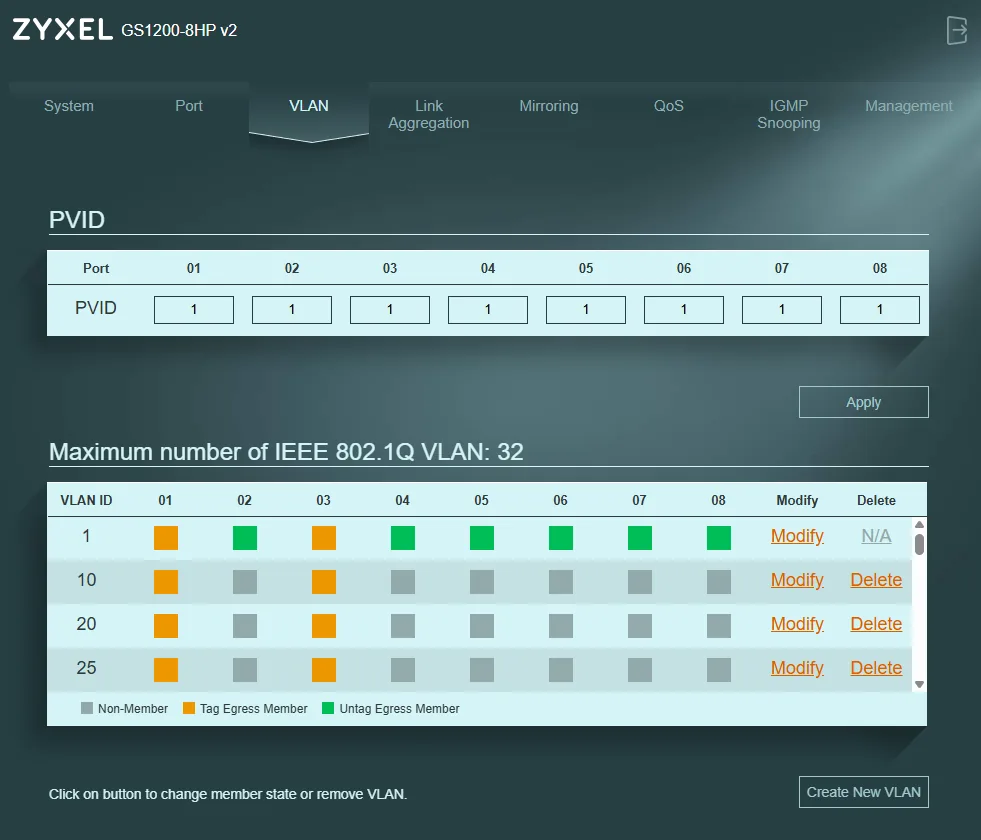
Mid-migration to a new management VLAN, I removed the old untagged VLAN from my laptop's switch port before setting the new PVID, and before the router had a working interface on the new VLAN. The switch applied each click instantly. I lost the switch UI, the hypervisor UI and the router at the same moment, with no out-of-band path back. A factory reset and clean rebuild was the correct recovery, and the rebuild produced a better design.
What I was trying to do
Move the management plane off the default VLAN onto a dedicated management VLAN. That's a reasonable goal. The mistake was changing everything at once: switch management IP, laptop IP, router management interface, port PVIDs and VLAN membership, all in one window.
The failure chain
- Membership before PVID. I removed the untagged default VLAN from the laptop's port. The new PVID wasn't set yet, so the laptop's untagged frames now belonged to nothing and were dropped. The browser session died mid-change.
- No Layer-3 path on the new VLAN. The VLAN existed on the switch, but the router's interface and routes for it were half-built. Even when the laptop was on the right VLAN, ARP and routing never settled:
Destination Host Unreachable. - Multiple truths. Switch, laptop, router and hypervisor each had a different idea of where management lived.
- The router wasn't broken, it was isolated. sshd was listening and the interfaces were up, but no frames reached it.
With no serial console and no out-of-band management, there was nothing left to log into.
Recovery
Factory-reset the switch, then rebuilt from scratch: fresh pfSense, fresh switch config, fresh VyOS config. I used the reset to commit to a cleaner architecture:
- pfSense = edge only: WAN, NAT, a transit link to the core
- VyOS = core router: one trunked interface, a sub-interface per segment (router-on-a-stick)
- Hypervisor management stays put; only VMs move onto tagged segments
The change rules I run now
- Freeze the management plane. Never migrate management in the same window as anything else.
- Build the new path first, prove it, then cut over. New VLAN, router interface, routes and a test host on it, verified, before touching the old path.
- Keep one known-good port untouched on the old management VLAN during any change.
- PVID before membership on switches that apply changes immediately.
- Write the rollback before the change.
Lessons
Management VLANs are supposed to be boring. Real datacenter outages start exactly this way: one person, one window, too many moving parts, no out-of-band path. Now I know how that feels.
Sources: Reset and rebuild guide (9 Dec 2025), Network rebuild guide (5 Dec 2025)